DBMS Architecture
Understanding the underlying structure of Database Management Systems, from physical storage to user views.
1View of Data (Three Schema Architecture)
The major purpose of DBMS is to provide users with an abstract view of the data. That is, the system hides certain details of how the data is stored and maintained.
To simplify user interaction with the system, abstraction is applied through several levels of abstraction.
Physical Level / Internal Level
- The lowest level of abstraction describes how the data are stored.
- Low-level data structures used.
- It has Physical schema which describes physical storage structure of DB.
- Talks about: Storage allocation (N-ary tree etc), Data compression & encryption etc.
- Goal: We must define algorithms that allow efficient access to data.
Logical Level / Conceptual Level
- The conceptual schema describes the design of a database at the conceptual level, describes what data are stored in DB, and what relationships exist among those data.
- User at logical level does not need to be aware about physical-level structures.
- DBA, who must decide what information to keep in the DB use the logical level of abstraction.
- Goal: ease to use.
View Level / External Level
- Highest level of abstraction aims to simplify users interaction with the system by providing different view to different end-user.
- Each view schema describes the database part that a particular user group is interested and hides the remaining database from that user group.
- At the external level, a database contains several schemas that sometimes called as subschema. The subschema is used to describe the different view of the database.
- At views also provide a security mechanism to prevent users from accessing certain parts of DB.
Three-Level DBMS Architecture – Summary
Example: College Student Database
Let's lock this in with one clean example.
Physical / Internal Level
➜ HOW data is stored
- Lowest level of DBMS
- Concerned with actual storage on disk
- Uses files, blocks, indexes, compression, encryption
Example
- Student records stored in disk blocks
- B+ Tree index on
RollNo - Data stored in binary format
Logical / Conceptual Level
➜ WHAT data is stored
- Describes database structure
- Defines tables, attributes, relationships, constraints
- Independent of physical storage
Example
STUDENT(
  RollNo INT PRIMARY KEY,
  Name VARCHAR(50),
  Department VARCHAR(10),
  Phone VARCHAR(10)
)
View / External Level
➜ WHAT part of data user sees
- Multiple views for different users
- Provides security & simplicity
- Users see only required data
Example
📌 One-Line Exam Summary:
"Physical level defines how data is stored, Logical level defines what data is stored, and View level defines whatdata is visible to users."
Personalized View Concept
Even with the same underlying database, different users/departments see only what is relevant to them.
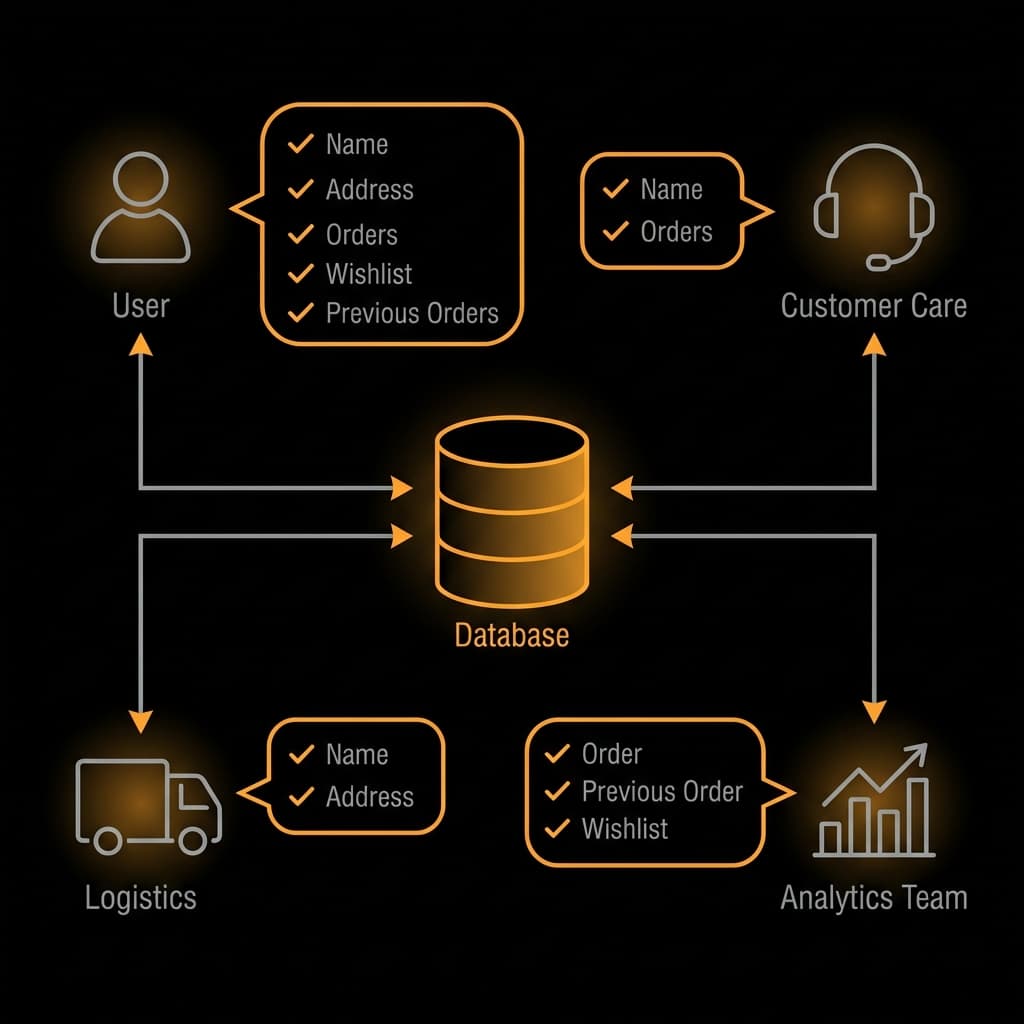
Fig: User Views interacting with Central Database
Three Schema Architecture Diagram
2Instances and Schemas
The collection of information stored in the DB at a particular moment is called an instance of DB.
- We have 3 types of Schemas: Physical, Logical, several view schemas called subschemas.
- Logical schema is most important in terms of its effect on application programs, as programmers construct apps by using logical schema.
- Physical data independence, physical schema change should not affect logical schema/application programs.
3Data Models
a. Provides a way to describe the design of a DB at logical level.
b. Underlying the structure of the DB is the Data Model; a collection of conceptual tools for describing data, data relationships, data semantics & consistency constraints.
c. E.g., ER model, Relational Model, object-oriented model, object-relational data model etc.
4Database Languages
DDL (Data Definition Language)
To specify the database schema.
We specify consistency constraints, which must be checked every time DB is updated.
DML (Data Manipulation Language)
To express database queries and updates.
- Retrieval of information stored in DB.
- Insertion of new information into DB.
- Deletion of information from the DB.
- Updating existing information stored in DB.
Query language, a part of DML to specify statement requesting the retrieval of information. Practically, both language features are present in a single DB language, e.g., SQL language.
5How is Database accessed from Application programs?
a. Apps (written in host languages, C/C++, Java) interacts with DB.
b.E.g., Banking system's module generating payrolls access DB by executing DML statements from the host language.
c. API is provided to send DML/DDL statements to DB and retrieve the results.
- Open Database Connectivity (ODBC), Microsoft "C".
- Java Database Connectivity (JDBC), Java.
6Database Administrator (DBA)
A person who has central control of both the data and the programs that access those data.
Functions of DBA:
- Schema Definition
- Storage structure and access methods
- Schema and physical organization modifications
- Authorization control
- Routine maintenance (Periodic backups, Security patches, Any upgrades)
7DBMS Application Architectures
Client machines, on which remote DB users work, and server machines on which DB system runs.
a. T1 Architecture
- The client, server & DB all present on the same machine.
b. T2 Architecture
- App is partitioned into 2 components.
- Client machine, which invokes DB system functionality at server end through query language statements.
- API standards like ODBC & JDBC are used to interact between client and server.
c. T3 Architecture
- App is partitioned into 3 logical components.
- Client machine is just a frontend and doesn't contain any direct DB calls.
- Client machine communicates with App server, and App server communicated with DB system to access data.
- Business logic, what action to take at that condition is in App server itself.
- T3 architecture are best for WWW Applications.
- Advantages:
- Scalability due to distributed application servers.
- Data integrity, App server acts as a middle layer between client and DB, which minimize the chances of data corruption.
- Security, client can't directly access DB, hence it is more secure.