Introduction to DBMS
1What is Data?
Data is a collection of raw, unorganized facts and details like text, observations, figures, symbols, and descriptions of things etc. In other words, data does not carry any specific purpose and has no significance by itself.
Moreover, data is measured in terms of bits and bytes – which are basic units of information in the context of computer storage and processing. Data can be recorded and doesn’t have any meaning unless processed.
Types of Data
- Numerical form
- Weight, volume, cost of an item.
- Descriptive, but not numerical.
- Name, gender, hair color of a person.
2What is Information?
- Info is processed, organized, and structured data.
- It provides context of the data and enables decision making.
- Processed data that make sense to us.
- Information is extracted from the data, by analyzing and interpreting pieces of data.
Example:If you have data of all the people living in your locality, that's just Data. When you analyze and interpret the data and come to some conclusion that:
- There are 100 senior citizens.
- The sex ratio is 1.1.
- Newborn babies are 100.
These conclusions are Information.
3Data vs Information
- Data is a collection of facts, while information puts those facts into context.
- While data is raw and unorganized, information is organized.
- Data points are individual and sometimes unrelated. Information maps out that data to provide a big-picture view of how it all fits together.
- Data, on its own, is meaningless. When it's analyzed and interpreted, it becomes meaningful information.
- Data does not depend on information; however, information depends on data.
- Data typically comes in the form of graphs, numbers, figures, or statistics. Information is typically presented through words, language, thoughts, and ideas.
- Data isn’t sufficient for decision-making, but you can make decisions based on information.
4What is Database?
Database is an electronic place/system where data is stored in a way that it can be easily accessed, managed, and updated.
To make real use of Data, we need Database management systems (DBMS).
5What is DBMS?
A database-management system (DBMS) is a collection of interrelated data and a set of programs to access those data. The collection of data, usually referred to as the database, contains information relevant to an enterprise. The primary goal of a DBMS is to provide a way to store and retrieve database information that is both convenient and efficient.
A DBMS is the database itself, along with all the software and functionality. It is used to perform different operations, like addition, access, updating, and deletion of the data.
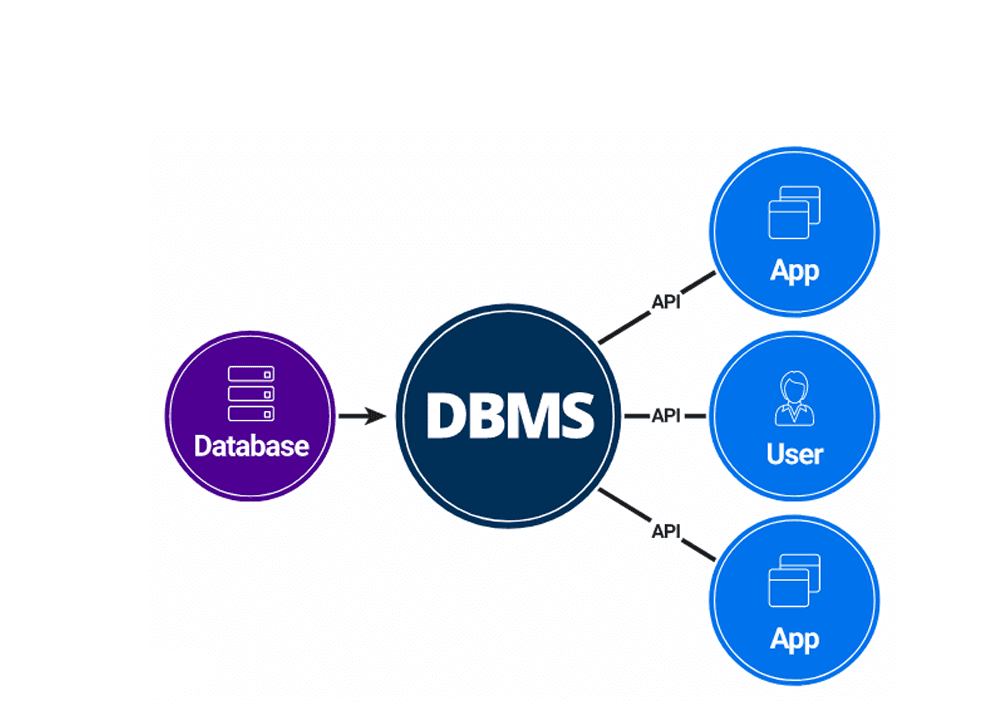
6DBMS vs File Systems
File-processing systems have major disadvantages (which became the reasons to use DBMS):
Data Redundancy and Inconsistency
The same data appears in multiple places, leading to mismatches.
Student address is updated in the 'Admission' file but not in the 'Library' file. Now the system has two different addresses for the same student.
Data is stored in one central place. You update it once, and the change is reflected everywhere automatically.
Difficulty in Accessing Data
Finding specific data requires writing new programs every time.
To find 'All students with >90% marks', you have to write a new C++/Java program to open the file and read every line.
You can just run a simple SQL query like 'SELECT * FROM Students WHERE marks > 90'. Answer comes in seconds.
Data Isolation
Data is scattered in different files and formats, making it hard to combine.
Student details are in a text file, but Fees are in an Excel sheet. It's very hard to write a program that combines them to check 'Who hasn't paid fees?'.
All data is stored in uniform tables. You can easily 'Join' the Student and Fees tables to get the answer.
Integrity Problems
It is difficult to enforce rules (constraints) on data.
A bank account balance should never be negative. In a file system, your code must check this. If the code has a bug, a balance of -500 might be saved.
You can set a rule 'Balance >= 0'. The DBMS automatically rejects any entry that violates this rule, keeping data safe.
Atomicity Problems
Operations must happen completely or not at all (no halfway states).
Transferring $100 from A to B. Money is deducted from A, but the computer crashes before adding to B. The money is lost!
Uses 'Transactions'. If a crash happens halfway, the DBMS automatically undoes the first step (Rollback), so no money is ever lost.
Concurrent-Access Anomalies
Multiple users editing data at the same time causes errors.
Two staff members try to update a student's address at the exact same moment. The last one to save overwrites the other, and one update is lost.
Uses 'Locking'. Staff A gets a lock on the data. Staff B has to wait until A is finished. No work is overwritten.
Security Problems
Hard to control exactly who sees what data.
You can password protect a file, but you can't say 'User A can see Student Names but NOT their Phone Numbers'. It's all or nothing.
Very granular control. You can say 'User A can Read the Names column, but cannot Read the Phone Number column'.
Note: The above points are also the advantages of DBMS (Answer to "Why to use DBMS?").